Friday, 20 November 2015

The Final Product

Through all of the time I had in the preliminary task I have now finished with my final product of a school / college magazine

FRONT COVER


CONTENTS PAGE

Obtaining Pictures

Me with the help of my peers, I went with people to help me take the photos while I found people willing to have their photo taken for our magazine. Out of all the images I had I had selected around 10 images that I think are quite good.

Out the 11 images here I chose two images, 1 for the Front Cover and 1 for the content page.


Front Cover:
Content Page:

Tuesday, 17 November 2015

Planning and Starting the creation for the Magazine Cover and Context page

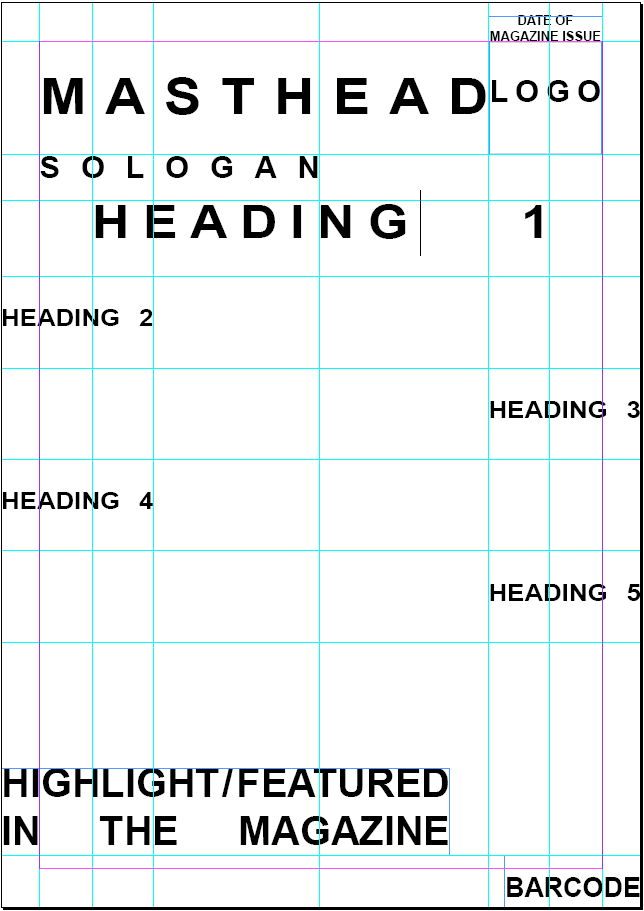
I have currently made a design layout for my front cover, I marked where I would put the Title, Logo, Slogan, Issue Date, The Heading, Barcode, and a 'featured' section. This is just to help me in the full creation of the Magazine and I may not follow this layout precisely, There might be somethings that I would find better and somethings that in the full creation I would think looks bad. But I think this is a very good layout for my magazine.

I have used a grid layout to mark each segment and columns that if I decided to make changes to the Headings, the guide can be used to help align the placement of the other headings together, this help keep the layout structured for a more formal look.


Friday, 13 November 2015

Planning for the Magazine

The aim of the magazine is to make a school / college magazine for students, I will create the front cover and the context page for this magazine, here is my written plan for each detail that will be needed in the creation of the magazine.

Magazine Topics:

Name: Schooled - The name is for what content I plan to put in my magazine, since my 

Logo: To Be Created

Target Audience: Students within 6th Form / College

Paper: Normal, Thin, Light coated paper

Price: I will have the price at £1 as the set price, it shows to be something simple for a price and that everyone can afford to have.

Writing Style: The writing style will be a small mix of Formal and Informal, following the results of the survey, since I'm only creating the Front Cover and the Context Page, there will be little use for this, but there will be places where it can be applied. The magazine will focus on academic topics which where formal will be showed but any categories that would be away from full focused academic topics would have a Informal Writing style.

Typography: The typography will be structured as in, spacing will be even out and it will all look very smart and somewhat 'blocky'.

Typeface: The fonts I would go with would be those that look like fonts such as Arial, Courier New & Times New Roman

Colour Pallet: Colours used would be a mix of Cool and Warm colours, but with all key topics or important points for the reader they will be highlighted with warm colours, this could also include sub heading and pages.I'll aim colours that will be Vibrant and contrasting to catch the full attention to readers.

Images: I will use friends and scenery from the school to have as pictures for my magazine, I'll aim to have 'leaders' within the school as a iconic figure for the magazine.In what will be the image will be something that would show, progression in learning or a friendly environment.

Reader Interaction: Games e.g. Crosswords, Sudoku. Link to School Twitter.


Tuesday, 20 October 2015

Survey Results

My Survey did not receive the amount of responses that I was expecting, right now (20/10/2015) I only have 10 responses, this was way below what I was expecting to get from the Survey from Survey Monkey. My Expectations was to get around 50-100 responses, since I sent it to around 2000 students within the school. It seems that what I expected was no where near what I got, Since this is only the preliminary task this means I can work on these mistakes to make sure things like this wont happen in the real task.

From the results from the other Surveys that was used to compare which one was the best.

SurveyMonkey: Does work fine, Complies results into graphs, Can view each individual response. There are limitations to the uses on SurveyMonkey when using a FREE account including only allowed a maximum of 100 responses

Google Form: It works quite well with the data collection and as far as we got with responses Google Forms does do things that you would have to pay to get from SurveyMonkey e.g. Having the data into an Excel File for easy individual analysis. Also the results shown for each question are somewhat displayed in a simpler way.

Smart Survey: Proven to be unreliable, the account for some reason no longer exists when login in and when trying to view the Survey.


Since there is a lack of responses and issue is that I cannot fully base the outcome of my Magazine with my response as there is not enough to base on the majority of people the Magazine will be targeted to. I cannot use the results to rely on how I should make the Magazine 100% though given the position I'm in this is the only thing I would be able to refer off.

In terms of what problems I've come across was that there was a lack of people responding to these surveys and this means that I will need to come up solutions to fix this. One Idea I have is to go up to people/groups/classes directly and ask them to take the survey, this would assure I could gain a fixed number of people taking the Survey having the people I would go directly to would be more likely to take the survey.
Another Idea would be to try asking around in a wider area, try people I know from other schools and see if they can get people there to participate in this.

I should also try to look for other ways to get results to assure I would still have some set of results to refer to if the Survey next time was also not as expected in the given results.

------------------------------------------------------------------------------------------------------------

Even though I got a low number of responses I did get some interesting ideas for content and colour schemes that would look good.
The results shown were when I had 14 responses.


Friday, 16 October 2015

Creation of a Survey

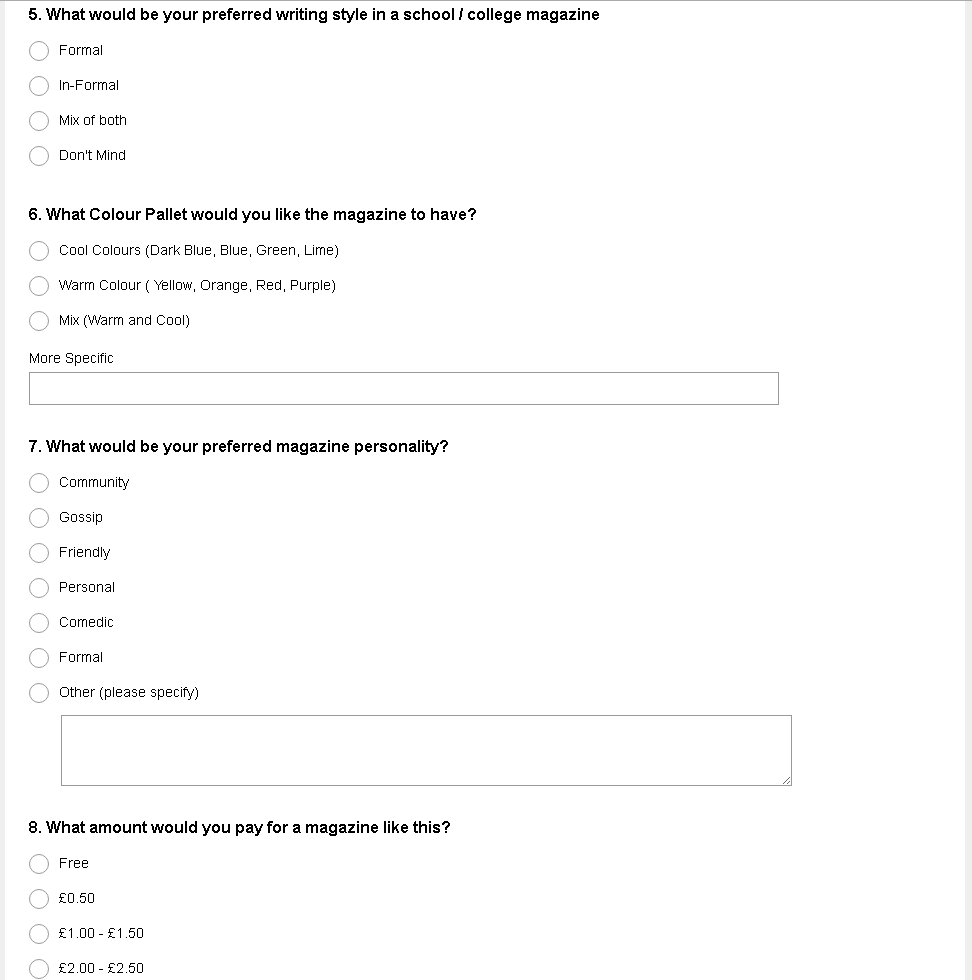
I have created a survey on SurveyMonkey, I will use the results collected to help plan the content that would be on the magazine to then create the context page and to make the front cover headlines following the choices the people made in the survey to apply into the magazine front cover and context page.
I have also teamed up with two others and we are all using different Survey Websites, to see which one is more better to use, Since this is a preliminary task we should attempt to use as many methods possible, so when it comes to the main task we would already know which is the better and recommend survey to use.
(The Sruveys used  are SurveyMonkey, Google Forms and Smart Survey)
This thing can be used for any other stages that would require multiple methods to make it.

This is the Survey with the question, the survey questions are made to get a general idea of what they want to see on this Magazine with will help chose the layout, colour pallet e.c.t to use in the magazine


Monday, 12 October 2015

Magazine Analysis

 Working with others we worked together to analyse this magazine to understand it and get ideas on how it was structured to use these ideas and incorporate it into our own magazines
Price: Free for all

Purpose: Aimed at potential students focusing on Higher Education in West London or Employment or Apprenticeship

Target Audience: Aimed at Students and people who are looking to move further in their education

Paper Used: Lightly Glossed, thick stock

Typeface: The type face is all similar for the text shown (excluding advertisements)

Writing Style: Structured, Factual, Clear, Tiered

Logo: The word "CHOICES", Causal, Non-formal, Arrow Implying Higher Future

Corporate Image: CfBT, Helpful 

Advertisement: They are advertising Schools and Colleges in West London to try getting students to enrol into their school. 

Layout: Formal Pages are divided into two vertically, Adverts are mostly 2 per segment and sometimes 3 per segment. Pattern is: One Topic of Self Made content | Advert

Colour: Vibrant, Pastel Colours, Contrasting, Vibrant

Slogan: No Visible Slogan

Measurements: A4

Reader Interaction: QR Scanner, Twitter, Website. The Content talks about options of the reader

Images Used: Stock Photos of Young, Happy people